Funding Schedule (FS)
Warning Do not use the browser's back button or refresh button while using P2i.
Refer to Contract to confirm this contract will suit your requirements before proceeding.
FS Overview
In the overview diagram:
-
 - is the procurement project including its workflow tasks
 -
 - is the contract.
Refer to Contract to confirm this contract will suit your requirements before proceeding.
FSD Overview
In the overview diagram:
-
- is the procurement project including its workflow tasks
-
- is the contract.
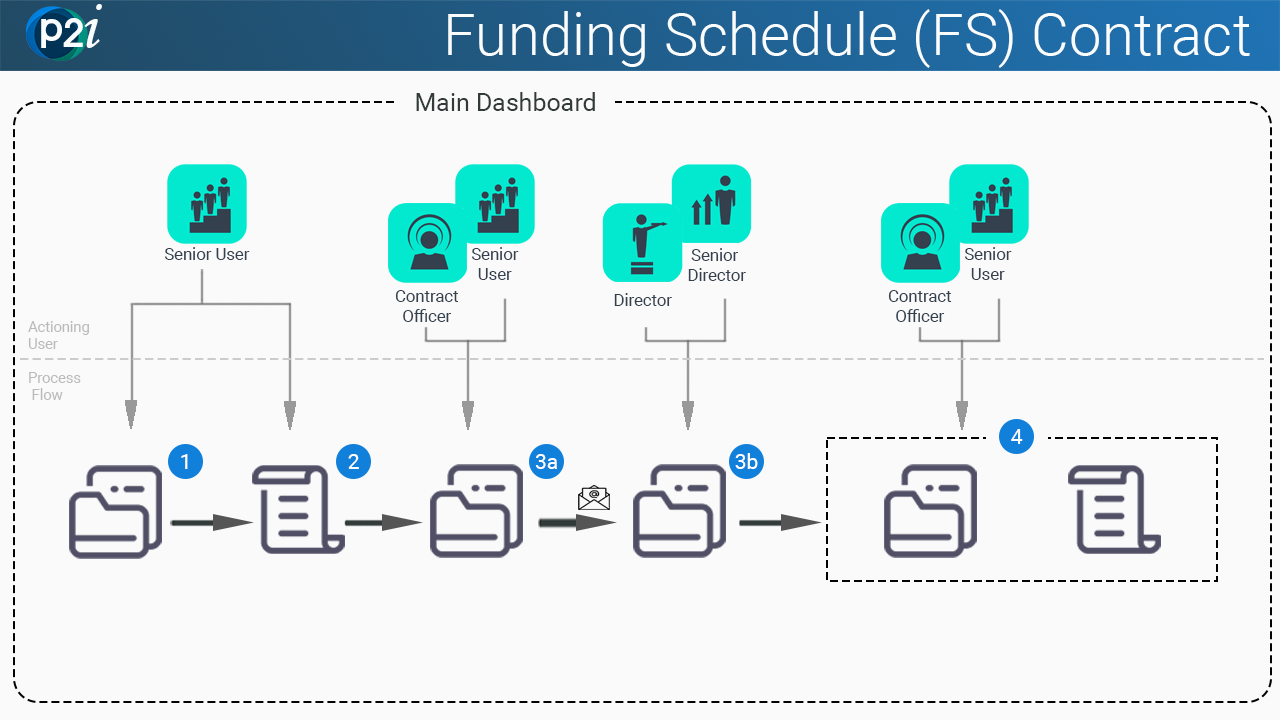
The P2i Senior User will:
The P2i Senior User will:
-
Set up an FS contract - there are xxxx actions:
-
enter Additional Information (i.e. manage the contract content)
-
enter a Pricing Table
-
complete the Investment Framework Lookup (IRF)
-
generate an MCD
-
ensure contract is valid and ready for activation
-
(optional) contract negotiation with Funded Organisation
-
change the contract's Contract Manager to the P2i Contract Officer
-
The P2i Contract Officer (or P2i Senior User) will:
-
Request FS approval from the P2i Director / Senior Director
-
P2i sends an email notifying the approver of the approval task
xx